









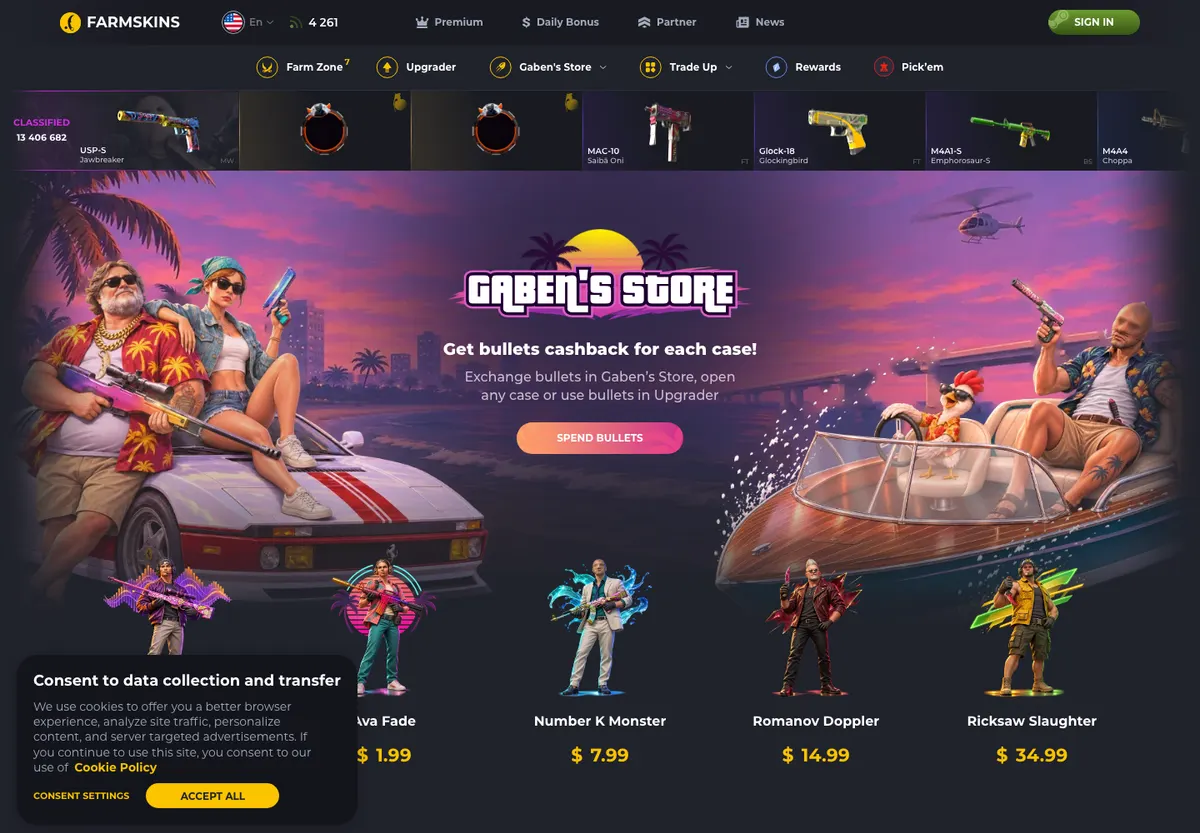
To log in to Farmskins, start at https://farmskins.com/ and use its documented Steam OpenID sign-in. Check that Steam is authenticating the account you intend to use before returning to Farmskins. The service supports CS2 skins and delivers item withdrawals through Steam trade offers, so choosing the correct Steam identity matters beyond opening your profile. If access fails, first identify whether the problem is Steam authentication, the return to Farmskins, or trading eligibility. Each needs a different fix; depositing is not a login-repair step.
Open https://farmskins.com/ to locate the Steam sign-in option after checking the address.
Links to the official site are independent and earn no commission. →
Start from the right address, not a login message
The official destination is farmskins.com. Type the address yourself or use a bookmark you previously checked. A familiar logo, a sponsored search result or a message from someone using a support-style name does not establish that a page is genuine. Treat any unexpected link that asks you to sign in as a new address to verify, even when its surrounding conversation looks familiar. An account belonging to a friend can also be compromised and used to distribute misleading links.
- Read the actual hostname in the address bar. A brand name appearing elsewhere in a long address is not proof that the brand controls the page.
- Check the Steam authentication destination separately from the Farmskins destination. A convincing starting page can still send you to a counterfeit login form.
- Do not treat the browser padlock as an endorsement. An encrypted connection can still lead to a fraudulent website.
- If the page arrived through a private message, close it and navigate independently instead of testing whether its login form works.
- Never install a browser extension, remote-access tool or downloaded account checker just to complete a sign-in.
Use Steam sign-in without handing over your password
Farmskins documents Steam OpenID as its login method in its terms. In a normal OpenID flow, Steam authenticates you and returns an identity confirmation to the requesting service. That is different from giving the service your Steam password. The following checks explain the general Steam authentication process; they are not a promise that every browser will show identical buttons or screens.
- Open Farmskins directlyStart from the official homepage and select its Steam sign-in option. Do not begin from a supposed account-warning link sent in chat.
- Inspect the Steam destinationFor Steam's web OpenID flow, check that the authentication page belongs to steamcommunity.com. Inspect the browser address, not a hostname printed inside the page. If a pop-up obscures the address or anything looks inconsistent, stop and navigate independently.
- Check which Steam account is activeIf Steam already recognises a session, inspect the account being presented before continuing. A shared computer or an old browser session may be signed into a different Steam account.
- Complete authentication only through SteamEnter credentials or approve a Steam Guard request only through the genuine Steam flow you initiated. Do not relay a code to a person claiming they will finish authentication for you.
- Check the return destinationAfter Steam returns you to Farmskins, confirm the address again and inspect the displayed account. If the session is wrong or incomplete, stop before making a payment, changing trade details or accepting an offer.
Steam display names and avatars are not dependable identity checks by themselves: they can change, and different accounts can look similar. Compare the Steam profile linked to the session with the profile you intended to use. On a shared device, finish by signing out of relevant sessions and avoid saving credentials in a browser that other people control.
Know which account detail does which job
Many apparent login problems are actually confusion between identity, account protection and item delivery. These details are related, but they are not interchangeable. The distinctions below are general Steam guidance, alongside Farmskins' documented use of OpenID and Steam trade offers.
| Detail | What it does | How to handle it |
|---|---|---|
| Steam OpenID confirmation | Identifies the Steam account signing into the external service. | Check the account and authentication destination before approving. |
| Steam password | Authenticates access to your Steam account. | Enter it only in a genuine Steam authentication flow, never in a support message. |
| Steam Guard approval or code | Adds an authentication check to the relevant Steam action. | Approve only an action you recognise; do not forward codes or screenshots. |
| Steam profile link | Helps identify the public-facing account. | Useful for identifying an account in support correspondence; it is not a password. |
| Steam Trade URL | Allows another party to address a trade offer to the relevant account. | Use your own link and keep unnecessary copies out of public posts. |
| Trade confirmation | Approves the specific trade details presented by Steam. | Read the recipient and item contents; successful login does not make an offer trustworthy. |
A Trade URL cannot substitute for a password, and a successful Steam login does not approve a later trade. Likewise, a public inventory does not prove that a person messaging you is its owner. Keep each decision separate: identify the account, verify the destination, then review any proposed item movement on its own merits.
Use Steam Guard without approving the wrong request
Steam Guard protects Steam account activity. Valve's account-security explanation describes the mobile authenticator's role in authentication and trade confirmations. As general security practice, an unexpected approval request deserves investigation rather than automatic acceptance. Check that you actually initiated the action and that the context shown by Steam makes sense. Repeated prompts do not become legitimate simply because they are inconvenient.
If you use a QR-based Steam login, apply the same principle: scan only a code in the genuine Steam authentication flow you opened yourself. Do not scan a code sent by someone offering support, verification or an account fix. If your authenticator is unavailable, follow Steam's own recovery options. Removing protection merely to make a skin-site session work can create a larger security problem and may affect trading eligibility.
Farmskins separately lists Steam Guard active for 15 days as an item-withdrawal requirement. That published condition concerns withdrawal readiness; it is not a reason to disclose a current code or remove an authenticator. For the effect of an account-security change on your own trades, read the restriction displayed by Steam rather than assuming a generic waiting period.
Set the Trade URL only after checking your identity
Farmskins' FAQ says withdrawals require a saved Trade URL, a Public Steam profile and inventory, and the stated Steam Guard history. These are documented withdrawal requirements, not a general instruction to weaken your account privacy whenever login fails. A Trade URL directs offers to an account; changing it does not reset a password or repair a broken browser session.
- Confirm the Steam account firstOpen your Steam inventory from the account you intend to use. Check its profile before copying any trading details, particularly if you maintain separate accounts.
- Find the link inside SteamIn Steam's inventory and Trade Offers area, look for the page controlling who can send you trade offers. Interface wording may vary. Copy the Trade URL supplied by Steam rather than one pasted by another person.
- Save it only at the checked destinationReturn to the genuine Farmskins session and use its Trade URL setting where available. Recheck the address if you followed a message or changed browser tabs.
- Review privacy deliberatelyIf you choose to withdraw, check the profile and inventory visibility required by Farmskins. Understand that public visibility exposes information; it does not grant permission for someone to manage your account.
If you generate a replacement Trade URL in Steam, update services where you still intend to receive offers. Treat the link as account-related information worth limiting, even though it is not a login secret. Receiving an unsolicited offer is not proof that your password has been stolen, but it is still a reason to inspect the sender and contents carefully.
Match the sign-in symptom to the right fix
The table below is a general troubleshooting framework, not a catalogue of official Farmskins error messages. Record where the process stops before changing settings. Whether Steam rejects authentication or Farmskins fails to retain the returned session determines which account or browser checks are relevant.
| What happens | What to check first | What not to do |
|---|---|---|
| Steam will not accept your credentials | Try accessing Steam directly through its official site or app; use Steam recovery if necessary. | Do not send credentials to Farmskins support or enter them in a replacement form supplied by chat. |
| The Steam approval never completes | Check the authenticator, the exact request and whether the login was initiated by you. | Do not approve unrelated requests or share a code to bypass the problem. |
| Steam succeeds but Farmskins remains signed out | Check the return address, stale tabs, cookie permissions and blocked navigation. | Do not assume a deposit or Trade URL change will repair the session. |
| A different profile appears | Inspect the Steam account already active in the browser, then restart from the official homepage. | Do not fund or use the unintended profile while trying to reconcile accounts. |
| Login works but withdrawal does not | Review the saved Trade URL, privacy settings, Steam Guard requirement and any Steam restriction. | Do not treat a trading restriction as evidence that the password is wrong. |
| The page reports an account restriction | Preserve the exact notice and contact the relevant official support channel. | Do not create replacement accounts or use location-masking tools to evade the restriction. |
If Steam signs in but the page keeps looping
Close duplicate authentication tabs and start again from the official homepage. An old return page may no longer correspond to the session you are trying to establish. Check whether the browser blocked a required pop-up, navigation or site cookie. Keep changes narrow: inspect the controls affecting the verified sites rather than disabling browser protection everywhere. If you clear site data, expect to be signed out and make sure you can complete Steam authentication again.
A separate, updated browser profile can help distinguish a local session problem from an account problem. Use only your own trusted device. If you test extension interference, do not install an extension offered as the cure. Stop repeating the same attempt once the behaviour is clear; a concise record of the failed stage is more useful to support than repeated unexplained refreshes.
If the wrong Steam profile appears
Check the Steam browser session rather than changing your public nickname to resemble the intended account. Sign out where appropriate, authenticate the correct Steam account, then begin a fresh Farmskins sign-in. Do not assume that matching email addresses, avatars or display names will merge separate Steam identities. If activity appears to belong to an unexpected profile after you have checked the account, stop and contact support with the profile links and a clear description. Do not send passwords as proof of ownership.
After resolving the identified issue, return directly to https://farmskins.com/ and retry Steam sign-in.
Links to the official site are independent and earn no commission. →
Recognise phishing disguised as account assistance
A sign-in problem can make an unsolicited offer of help seem useful. Judge the requested action, not the sender's confidence. A person who knows your public inventory or copies a support avatar has not demonstrated account authority. The following are general security warning signs, not claims about Farmskins' support practices or evidence that a particular account has been compromised.
- Someone asks for a Steam password, Steam Guard code, recovery code, browser session data or a screenshot containing authentication information.
- An account asks you to scan a login QR code outside the Steam flow you initiated.
- A supposed agent tells you to transfer items to a temporary, verification or safe account.
- A helper asks you to approve an offer whose contents do not match the explanation.
- An account-recovery service demands payment while promising to restore access or recover items.
- A message claims your account can be fixed only by downloading software, sharing your screen or allowing remote control.
- A link imitates the official destination with altered spelling or uses a brand name to distract from a different hostname.
Separate authentication from item movement. Valve describes Trade Offers as prearranged trades with specified contents on each side. An offer therefore needs its own inspection, even if you recently signed in successfully. Do not accept an outgoing item transfer merely because someone calls it account verification. Compare what Steam actually shows with the action you intended, and stop if the explanation and contents differ. For a broader offer-review checklist, see trade safety.
Recover Steam access before troubleshooting Farmskins
If you cannot access Steam itself, or suspect that someone else controls it, begin with Steam Support. Steam account recovery and a Farmskins session problem are different matters. Farmskins' published support contacts are appropriate for service-side issues; they are not a substitute for Steam's ownership checks.
- Use a trusted deviceIf you suspect malware or a hostile extension, avoid entering new credentials into the same environment until it has been checked. Do not let the person offering unsolicited help perform that check remotely.
- Secure the linked email accountReview its access and recovery settings through the email provider. Protecting Steam while leaving its recovery mailbox compromised can leave a route back into the account.
- Follow Steam's recovery routeUse Steam Support's options for a stolen account, forgotten password or lost authenticator, according to the actual problem. Supply ownership evidence only through the genuine support process.
- Review access after recoveryCheck available device and session controls, security settings, pending offers and recent activity. Change compromised credentials and follow the current instructions Steam provides.
- Then inspect FarmskinsReturn through the official address, verify the Steam identity and review relevant account activity. Report unfamiliar service-side activity with dates, screenshots and identifiers rather than secrets.
Recovering account access does not establish that an item can be returned or that an external service will reverse an action. Preserve relevant messages and trade records, and follow the current options shown by Steam and the service concerned. Do not pay a stranger who promises restoration. Avoid publishing full receipts or account-recovery evidence while asking for public help.
Do not confuse successful login with withdrawal readiness
Farmskins says cash withdrawal is not possible; withdrawals are in-game items sent through Steam trade offers. Its FAQ says delivery is usually within 45 minutes, delayed delivery can take up to 24 hours, and rejected offers return after 1 hour. Those are published item-delivery statements, not a timetable for fixing a login problem. Keep the relevant offer or withdrawal identifier when asking about a missing item.
The FAQ also states that a deposit is required before item withdrawal, normally with a $4 minimum that may be raised for promo abuse. This does not mean a payment is required to repair Steam authentication. If someone describes a payment or item transfer as a technical login fix, verify the claim through official support before doing anything.
Valve describes a trade hold as Steam retaining items before delivery, allowing time to address fraudulent activity. A Steam restriction or hold is therefore different from a website failing to establish your session. Read the actual Steam notice; do not apply an assumed waiting period from someone else's account. For the separate funding and delivery workflow, use deposit and withdrawal guidance.
Treat identity verification as a separate security step
Steam OpenID identifies the Steam account used for sign-in. It does not replace every identity or compliance check that an external service may require. Farmskins' AML policy names Sum and Substance as its verification provider and describes checks for suspicious activity, high-risk jurisdictions and certain transactions. The company states that it does not store ID documents.
That documented provider relationship is not proof that any message mentioning verification is authentic. If an identity-document request appears unexpectedly, confirm the request through the genuine Farmskins account or its published support contact before submitting anything. Keep documents out of public chats and never substitute a Steam password or Guard code for identity evidence. If you cannot establish where a request came from, pause rather than uploading documents to a link supplied by a stranger.
Send support a useful report without exposing secrets
Farmskins publishes support@farmskins.com as its support email, and its FAQ mentions live chat and a ticket system. The contact page lists support hours as daily 09:00–19:00 UTC, with replies usually within 24 hours. These are published service expectations, not a guaranteed resolution deadline. If you cannot establish a session to use an on-site channel, the published support email provides a separate contact route.
- Identify the affected Steam profile with its public profile link, not its password.
- Describe the exact stopping point: before Steam authentication, during approval, after the return, or only when requesting an item.
- Include the date, approximate time and time zone so the event can be located.
- Copy the error wording accurately and explain whether Steam works independently.
- Name the browser and device type, along with relevant troubleshooting already attempted.
- Attach a cropped screenshot if useful, removing codes, recovery information, unrelated personal details and sensitive address parameters.
- For a withdrawal issue, include the relevant offer or transaction identifier without posting it publicly.
A useful report might say: Steam authentication completes, but the browser returns to the official homepage still signed out; Steam works directly, and a fresh browser session behaves the same way. This separates a return-session problem from lost Steam access. Keep follow-up correspondence together where possible. For contact details and preparation guidance, see Farmskins support.
Before you retry: a short security checklist
- The browser is on farmskins.com, and the Steam authentication destination has been checked separately.
- The Steam account being approved is the account you intend to use.
- You initiated the authentication request and have not shared passwords, Guard codes or recovery information.
- You know whether the failure concerns Steam access, the returned browser session, account verification or withdrawal eligibility.
- Any Trade URL was copied from your own Steam account, not supplied by a helper.
- Any pending offer has been checked independently of the login process.
- If the issue remains unresolved, you have a precise, sanitised report for the appropriate official support channel.
Farmskins login questions
No matching questions found.
Where is the official Farmskins login?
Do I give Farmskins my Steam password?
Why does Farmskins keep sending me back to login?
Why am I seeing the wrong Steam account?
Does my inventory need to be public to sign in?
Can someone log in using my Steam Trade URL?
What if I lost the phone used for Steam Guard?
Who should I contact if Steam works but Farmskins does not?
Use https://farmskins.com/ for your next sign-in attempt only after completing the relevant security checks.
Links to the official site are independent and earn no commission. →
This independent guide is for informational purposes and is not affiliated with Farmskins.