








The FAQ lists card payments through ZEN, BLIK, bank transfer, Klarna Sofort, Coinbase crypto, Skin2pay and G2A/Kinguin gift cards. The normal minimum deposit is $4, and most deposits take 5–30 minutes to process. Withdrawals work differently: Farmskins sends in-game items through Steam trade offers, not money to a card, bank account or crypto wallet. For general information, the details below describe the published methods and requirements; they are not instructions to access or use Farmskins from Australia.
Review the available payment methods and final checkout details before committing funds.
Links to the official site are independent and earn no commission. →
Choose a deposit method that fits your payment route
Farmskins publishes a useful range of funding methods, but a method named in its FAQ is not a promise that every account or country can use it. Availability can depend on the provider and the payment presented at checkout. Start with the options actually offered to you, then compare the amount charged with the balance you will receive. Do not assume a familiar payment logo means the same fees, limits or processing rules as another service.
| Method | Published detail | What to check before paying |
|---|---|---|
| Card through ZEN | Card deposits are handled through ZEN. | Card-country eligibility, final charge and any provider conditions. |
| BLIK | Listed as a deposit method. | Whether it is offered for your payment and what amount will be credited. |
| Bank transfer | Listed as a deposit method. | The beneficiary, reference and instructions shown for that payment. |
| Klarna Sofort | Processing can take up to 3 days. | Whether that processing window suits your plans. |
| Coinbase crypto | The FAQ specifies 6 confirmations. | The supported asset, network, destination and requested amount. |
| Skin2pay | Listed as a deposit route. | The accepted items, valuation and final balance credit shown by the provider. |
| G2A/Kinguin gift cards | Named in the FAQ as deposit options. | The exact voucher product, redemption conditions and account compatibility. |
| Steam Wallet | Not accepted. | Do not buy or redeem a Steam Wallet code expecting to transfer it to Farmskins. |
Card and bank payments: check eligibility before retrying
ZEN does not accept cards from some countries, including Australia, Austria, the Netherlands, China and Singapore. This is a payment-provider restriction, not a complete statement of where Farmskins itself permits access. For general information, a rejected card may reflect provider eligibility or other conditions. For bank transfers, the instructions attached to a payment can vary; do not assume details from one transaction apply to another.
Crypto and skin deposits need different checks
For general information about crypto payments, matching the asset and network is as important as copying the destination correctly. Farmskins names Coinbase and requires 6 confirmations, but that does not mean every coin or network is supported. The supported choices and instructions depend on the payment. A transaction hash and payment reference can help identify a transaction; never share a wallet recovery phrase or private key with support. These are general crypto-payment precautions, not additional Farmskins rules.
Skin2pay is described as a funding route, not evidence that Farmskins operates a cash-out marketplace. In general, an external provider’s proposed exchange may specify which items leave an inventory, how they are valued and what balance is credited. Farmskins supports CS2 items; that does not establish which items an external funding provider accepts. Steam Wallet is separate: Steam Community Market proceeds become Steam Wallet funds, which Farmskins does not accept as a deposit.
Understand the minimum, limits and total cost
The normal minimum deposit is $4. Farmskins also says a deposit is required before item withdrawal and that the minimum can be raised for accounts it considers to be abusing promotions. These are the brand’s published terms, not an assurance that every account, provider or transaction can proceed on identical terms.
- Eligibility: Farmskins states that players from some locations are not accepted; local law and the brand’s restrictions apply.
- Charge: payment-provider charges and currencies vary; this information does not indicate that payment is available or permitted in Australia.
- Credit: a payment balance is a platform credit, not cash or a cash-withdrawal entitlement.
- Additional costs: provider, bank, wallet or exchange charges may vary.
- Limits: published payment-method limits do not establish that a method is available or permitted in Australia.
- Withdrawal readiness: Farmskins describes item delivery through Steam; this does not establish that the service is available or permitted in Australia.
Farmskins does not state a universal maximum deposit, a complete method-by-method fee schedule or a universal item-withdrawal value limit in its published FAQ and terms. That is not evidence of unlimited transactions or fee-free payments. Use the final payment details and ask support about any restriction that matters to your decision. For a broader explanation of platform values, provider charges and why an item’s displayed value is not a cash quote, see the Farmskins fees guide.
Make a deposit without losing track of the payment
- Check access and set your spending boundaryFarmskins is not available to players in Australia. Its published terms and local restrictions are relevant context; this page does not provide instructions for using the service from a restricted location.
- Sign in through the official Farmskins siteFarmskins uses Steam OpenID. This is general information about the sign-in method; it is not guidance to access the service from Australia, where Farmskins is restricted.
- Choose an available method and inspect the quoteFarmskins’ published payment information describes checking the amount, currency, balance credit and provider conditions. This is general information only and not a recommendation or instruction to make a payment from Australia.
- Complete the provider’s instructions carefullyFarmskins’ published payment information describes provider instructions for crypto, bank transfers and skin-funded transactions. It does not establish that these routes are available or permitted in Australia.
- Save evidence and let the payment resolveFarmskins publishes general deposit processing estimates of 5–30 minutes for most methods, with separate conditions for Klarna Sofort and Coinbase. These estimates do not establish availability or permission to use the service in Australia.
Farmskins’ terms prohibit users from Denmark, Norway, Sweden, Belgium, Russia and Slovakia, as well as sanctioned and FATF-listed countries. Farmskins is also not available to players in Australia. A payment provider accepting a payment would not override those restrictions or local law. Do not use another payment method to evade an account or location restriction.
Prepare Steam before requesting an item
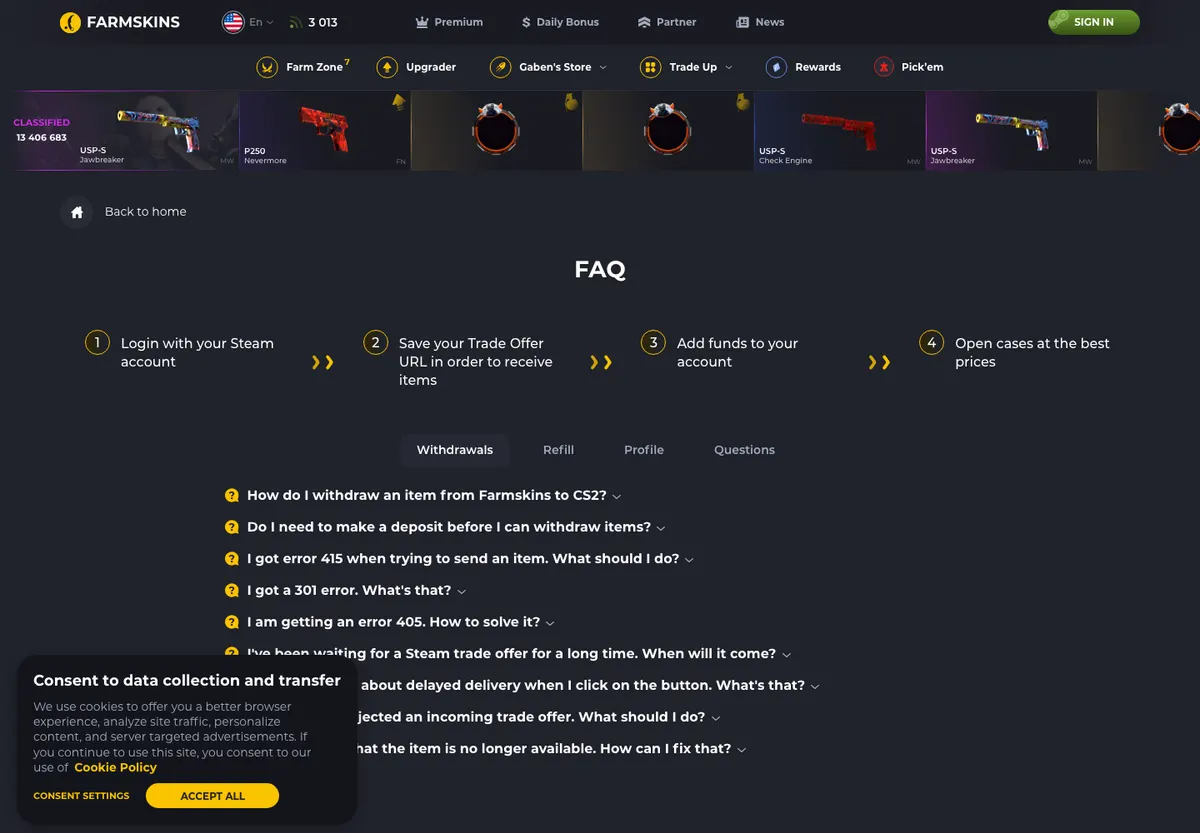
Farmskins withdrawals deliver in-game items through Steam trade offers. Cash withdrawal is not possible, so a card or crypto deposit cannot later be paid out through the same route as an ordinary withdrawal. For item delivery, the FAQ requires a saved Steam Trade URL, a Public Steam profile and inventory, and Steam Guard active for 15 days. The deposit requirement must also be satisfied. Completing a payment does not automatically make an otherwise restricted Steam account ready to trade.
- Confirm you are signed in with the Steam account intended to receive the item.
- Save the current Trade URL for that account, not a profile address or a link belonging to another account.
- Set both the Steam profile and inventory to Public, as required by the Farmskins FAQ.
- Confirm Steam Guard has been active for the required 15 days.
- Check Steam itself for any account-specific trading restriction or warning.
- Confirm the Farmskins deposit requirement has been met before requesting delivery.
Use the right Trade URL and understand what it does
In general Steam trading, a Trade URL lets another party send a trade offer to the linked account. It is not your Steam password and does not itself approve an outgoing exchange. Find it within Steam’s trade-offer settings, copy it accurately and verify that the linked inventory belongs to you. If you regenerate the URL, update any service where you deliberately use it before requesting another delivery. Never supply a Steam Guard code simply because someone claims they need it to send an offer.
Steam visibility and Steam trading eligibility are different. A Public inventory can make items visible without removing a trade restriction. Likewise, Farmskins’ published Steam Guard requirement should not be treated as a complete list of every restriction Steam might apply to an individual account. Read the message shown by Steam rather than trying to fix every problem by changing profile privacy. The trade-safety guide explains these general account and offer checks in more detail.
Check your account requirements and the item you intend to receive before requesting a Steam trade offer.
Links to the official site are independent and earn no commission. →
Withdraw a skin and inspect the Steam offer
- Identify the item you want deliveredReview the item in your Farmskins inventory before using its withdrawal action. Make sure you want the item itself, rather than assuming its platform value can be converted into a payment.
- Check account readiness and request withdrawalConfirm the saved Trade URL, Public profile and inventory, Steam Guard requirement and deposit requirement. Keep a record of the item and when you submitted the request.
- Look for the offer inside SteamFarmskins says delivery is usually within 45 minutes, with delays taking up to 24 hours. Open Steam directly to review incoming trade offers rather than relying on a link from a stranger.
- Inspect both sides of the exchangeCheck the item name and any displayed attributes, along with everything the offer asks you to send. A message claiming an unexpected outgoing item is needed for verification is not a reason to approve it.
- Verify the final outcome in SteamAfter completing the legitimate offer, check your Steam inventory and trade history. If you reject an offer, the Farmskins FAQ says the item returns after 1 hour; contact support if the actual outcome does not match that guidance.
The inspection step matters because Steam Trade Offers package the proposed exchange for both sides. A familiar avatar, display name or message is not enough to establish that an offer is correct. Read the actual contents. General CS2 attributes such as wear, StatTrak status and stickers can distinguish otherwise similar-looking items, so compare the details available to you rather than judging only by the thumbnail. Stop if something differs from what you requested; do not accept first and hope to correct it afterward.
Separate payment time from item-delivery time
| Event | Farmskins guidance | Important distinction |
|---|---|---|
| Most deposit methods | 5–30 minutes | General deposit guidance, not a delivery estimate for a skin. |
| Klarna Sofort deposit | Up to 3 days | A separate payment-method window; do not substitute the usual deposit estimate. |
| Coinbase crypto deposit | 6 confirmations | A blockchain confirmation requirement, not a fixed number of minutes. |
| Item withdrawal | Usually within 45 minutes | The usual Steam-offer delivery guidance, not an unconditional deadline. |
| Delayed item delivery | Up to 24 hours | The FAQ’s extended delivery guidance; investigate account or offer problems separately. |
| Rejected trade offer | Item returns after 1 hour | A return process, not a new payment or a cash refund. |
| Support response | Usually within 24 hours | A response estimate, not a promise that the underlying transaction will be resolved. |
These periods describe different stages and should not be added together as a promised end-to-end timetable. First identify what is actually waiting: payment authorization, balance credit, an incoming offer or a return after rejection. A Steam trade hold is another distinct concept. Valve describes a hold as Steam retaining items before delivery so compromised-account owners can cancel fraudulent trades. That is general Steam infrastructure, not a Farmskins processing fee or a reason to deposit again. Follow Steam’s own notice if it reports a hold.
Troubleshoot the stage that is actually stuck
Your bank shows a payment, but the balance is missing
A bank or payment provider may describe a transaction as pending, completed or declined. Those general payment states do not establish that Farmskins has credited a payment. This page is informational; Farmskins is not available to players in Australia, and it does not provide instructions for making or retrying a payment from there.
Your crypto transaction was sent, but has not credited
Locate the transaction hash and check whether the transfer has reached the required 6 confirmations. Also compare the asset, network and destination with the original payment instructions. A transaction being broadcast is not the same as satisfying the confirmation requirement. If the details do not match, stop before making another transfer and ask the provider or Farmskins support what can be investigated. Do not assume a wrong-network transfer can be recovered, and do not pay someone who contacts you privately claiming they can unlock the funds.
Your item request has not produced a usable offer
Check Steam directly for an incoming, rejected or expired offer, then review the saved Trade URL and account requirements. Correct any obvious mismatch before submitting another request. If there is no clear account issue, compare elapsed time with the usual 45-minute guidance and the delayed-delivery window of up to 24 hours. An incorrect offer or suspected account compromise needs attention immediately; the delivery window is not a reason to accept suspicious contents. Record the item name and request time so support can distinguish delivery trouble from a rejected-offer return.
Verification or an account review interrupts the transaction
Farmskins’ AML policy names Sum and Substance as its verification provider. Verification can apply to suspicious activity, high-risk jurisdictions and certain transactions; it is not described as a universal check with a published spending threshold. The company states that it does not store identity documents. If verification is requested, confirm the request through official account or support channels and use the designated verification process. Never send identity documents to an unsolicited social-media contact, and do not try to bypass a review by creating another account or switching payment routes.
Keep balance, Bullets and refunds separate
The terms say balance credits are not worth real money and are not refundable. Bullets and Crystals also have no cash value, cannot be transferred and are forfeited when an account is terminated. These distinctions matter when assessing any credit or reward displayed in the account: an internal unit is not money waiting to be withdrawn. Gaben’s Store accepts Bullets for cases, skins and balance cards, while Skin Changer settles item-value differences in Bullets. Neither feature establishes a cash-redemption route.
The refund wording needs particular care. One section allows a refund request within 14 days of payment if the funds remain unused, but that same section also says purchases are final and non-refundable. Those statements do not support an unconditional refund promise. If you paid by mistake or need clarification, leave the funds unused and ask support promptly how the clause applies to your payment. A possible payment refund is different from withdrawing balance, reversing a case result or exchanging an unwanted skin for cash.
Do not treat an external resale as a workaround for the no-cash-withdrawal rule. Farmskins’ terms prohibit reselling skins on third-party marketplaces and real-money exchanges. The practical decision is whether you want the supported CS2 item under those terms, not whether a displayed platform value can be extracted elsewhere. The how-it-works guide explains the wider path from account setup to item delivery.
Give support the evidence needed to trace the issue
Farmskins lists support@farmskins.com, and its FAQ also mentions live chat and a ticket system. Published support hours are daily 09:00–19:00 UTC, with replies usually within 24 hours. Contact support with a clear description of the stage that failed rather than only saying the withdrawal or deposit is missing. A response estimate is not a resolution guarantee, particularly when a payment provider, blockchain transaction or Steam restriction is involved.
- Identify the affected Steam-linked account through the official support process.
- Include the payment method, submission time, amount and relevant transaction reference.
- For crypto, provide the transaction hash and the asset and network used.
- For an item problem, provide the item name, request time and Steam offer status or trade reference if available.
- Describe the checks already completed and attach redacted screenshots of relevant messages.
- Exclude passwords, Steam Guard codes, wallet recovery phrases and full card details.
If the problem is prompting you to deposit again, pause until the earlier transaction is understood. A new payment does not resolve an incorrect Trade URL, a pending blockchain confirmation or an account review. Likewise, spending more to recover an unwanted result increases exposure rather than fixing a payment issue. Use the support guide for contact preparation, or the responsible-play guide if staying within a budget is becoming difficult.
Final checklist before you pay or withdraw
- Farmskins is not available to players in Australia. Its published deposit information describes method availability, charges, credited balance and processing conditions.
- Farmskins describes item withdrawals through Steam, but this does not establish that its service is available or permitted in Australia.
- Published payment and delivery estimates do not establish that Farmskins is available or permitted in Australia.
- Farmskins describes item delivery through Steam trade offers; this information is not an instruction to use the service in Australia.
- Farmskins provides item withdrawals, not cash withdrawals. It is not available to players in Australia; keep gambling within an affordable entertainment budget where permitted.
Farmskins deposit and withdrawal FAQ
No matching questions found.
Can you withdraw money from Farmskins to a card or crypto wallet?
What is the minimum Farmskins deposit?
Does Farmskins accept Steam Wallet or skin deposits?
How long do Farmskins deposits take?
How long does a Farmskins skin withdrawal take?
Why can’t I withdraw an item after depositing?
Does Farmskins require identity verification?
Can I get a refund for an unused deposit?
Proceed only after checking method availability, account requirements and the final transaction terms.
Links to the official site are independent and earn no commission. →
This independent guide is for informational purposes and is not affiliated with Farmskins.