







To receive a Farmskins skin safely, check both your Steam account and the exact trade offer—not just the site's appearance. Farmskins documents Steam OpenID sign-in, item delivery through Steam trade offers and specific withdrawal requirements, giving you practical checks before you proceed. Those features do not guarantee account security, fair outcomes or successful delivery. This guide separates Farmskins rules from general Steam precautions, explains trade links and holds, and shows when to stop and contact support. Case opening and other chance-based modes are 18+ and carry a house edge.
Opens the Farmskins FAQ, where published account and item-delivery requirements are described. Farmskins is restricted in Australia.
Links to the official site are independent and earn no commission. →
What the documented safeguards actually tell you
A useful answer to “is Farmskins safe?” needs to separate several questions. Is the page you opened genuine? Is your Steam account protected? Does the incoming offer match your withdrawal? Can you independently verify the game result? A satisfactory answer to one does not settle the others. A genuine Steam sign-in can still be followed by a misleading message from an impersonator, while an authentic item delivery says nothing about the value of future case results.
| Documented detail | What it helps you check | What it does not establish |
|---|---|---|
| Sign-in uses Steam OpenID. | Whether you are following the expected authentication method. | That every link, message or later trade offer is genuine. |
| Withdrawal requires a saved Trade URL, Public Steam profile and inventory, and Steam Guard active for 15 days. | Whether your account meets Farmskins' published withdrawal prerequisites. | That Steam has no other restriction affecting a particular item or trade. |
| Items are delivered through Steam trade offers. | Where to inspect the actual exchange before accepting it. | A universal delivery guarantee or protection against accepting the wrong offer. |
| The operator is ARPS LOOP LTD, registered in Cyprus. | The company identified in the terms. | Gambling licensing, regulator approval or an independent security audit. |
| Cash withdrawal is not available. | That the documented withdrawal route is an in-game item. | That a displayed skin valuation can be redeemed for that amount in money. |
The sensible position is caution, not a blanket endorsement. Farmskins is restricted in Australia, and the terms do not name a gambling licence or set out a reproducible seed-and-hash verification procedure. Company registration and familiar sign-in technology do not settle those questions. For a broader assessment of features and limitations, see the Farmskins review.
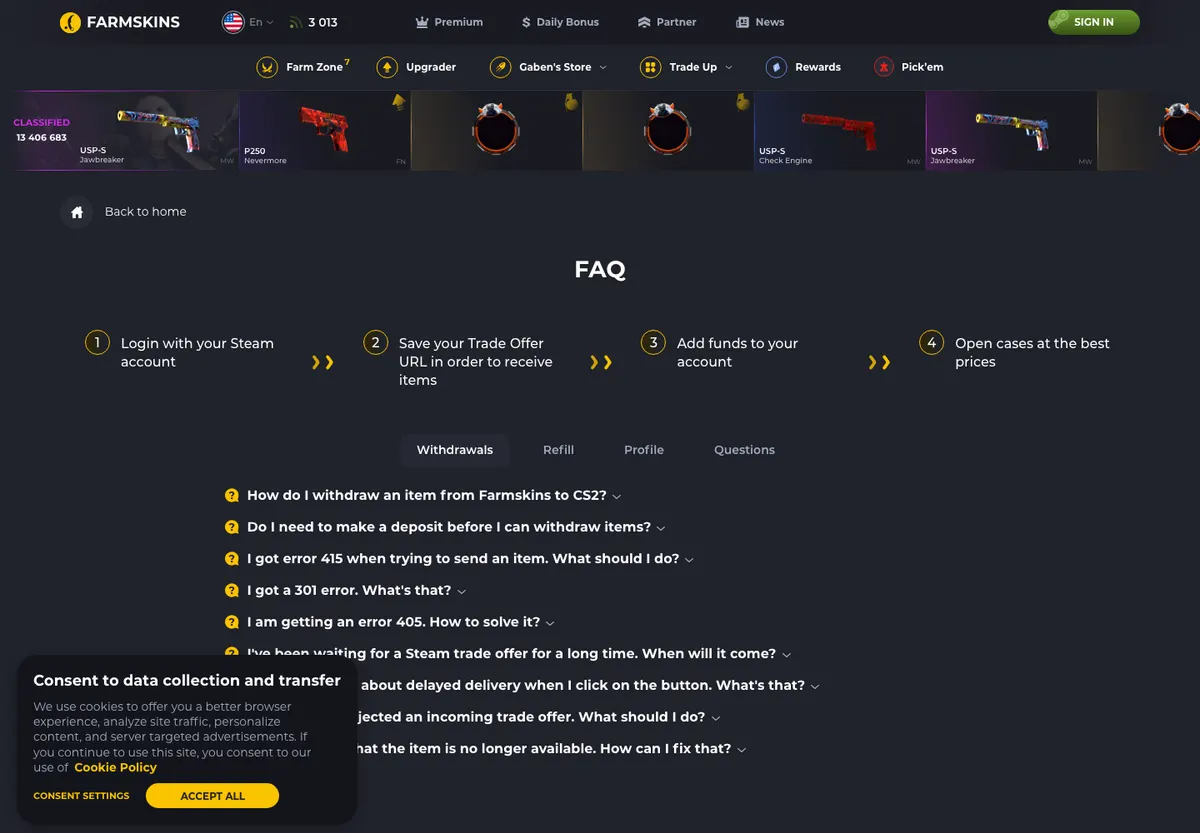
The official Farmskins FAQ describes published withdrawal requirements. A screenshot is not proof that a message, browser tab or trading account belongs to Farmskins. The account, trade-link and scam precautions below are general Steam security information unless explicitly attributed to Farmskins. Farmskins is restricted in Australia; this information is not guidance on accessing or using the service.
Prepare Steam before requesting a skin
Farmskins states that Steam Guard must have been active for 15 days, alongside a saved Trade URL and a Public Steam profile and inventory. These are the brand's stated prerequisites, not a complete explanation of every Steam trading rule. General Steam security is separate: the Steam Guard Mobile Authenticator supports authentication and trade confirmations, while Steam determines which restrictions apply to an account. Farmskins is restricted in Australia; these details are not instructions for using it.
- Start from the official addressFor general security, independently verify a site's address rather than trusting a chat message or an advertised support link. A familiar logo, copied page design or browser padlock does not establish who operates a page. Farmskins is restricted in Australia; do not use this advice to access its service.
- Inspect the Steam sign-in destinationFarmskins documents Steam OpenID. In general, check that an authentication page belongs to Steam before entering credentials or approving access. If a page requests recovery codes, session cookies or an unrelated account transfer, stop. This is security information, not a recommendation to sign in to Farmskins.
- Check security inside SteamUse the Steam client or app you opened yourself to inspect Steam Guard and any trading notices. Do not rely on a stranger's screenshot or explanation of your account status.
- Review the required privacy settingsFarmskins states that a Public profile and inventory are required for withdrawal. Public settings affect what other people can see; consider that privacy impact before changing settings. This information does not recommend using the restricted service.
- Read restrictions before adding fundsSteam trading limitations are controlled by Steam. A deposit to a gambling site does not override Steam's decision, and site support cannot be assumed to remove a Steam-imposed restriction. Farmskins is restricted in Australia.
Also protect the email account associated with Steam. A strong Steam setup is less useful if someone controls the inbox used for account recovery. Keep recovery material private and avoid sharing your screen while authentication details are visible. For general Steam sign-in information, see the Steam login guide.
Understand the risks of Steam Trade URLs
A Steam Trade URL lets another party send an offer to the account associated with that link. It is not a Steam password, and receiving an offer is not the same as authorising an exchange. Sharing it publicly may make it easier for unwanted accounts to send offers. Farmskins states that a Trade URL is required for withdrawals; this is descriptive information, not a recommendation to use the restricted service.
- Get the link from your own Steam accountSteam Trade URLs are account-specific. Links supplied by strangers claiming to prepare a withdrawal should not be trusted. Farmskins is restricted in Australia; this is not guidance for requesting a withdrawal.
- Be wary of sharing trade links with third partiesA saved link can be associated with the wrong account or copied incorrectly. Avoid sharing it with strangers, and treat any request to change account details as a potential risk.
- Treat changed links cautiouslyChanging a Steam Trade URL can affect incoming offers. Be cautious about requests to update a stored link or resubmit a transaction, particularly if they arrive through an unsolicited message.
An invalid link and a compromised account are different problems. A truncated or outdated URL may explain an offer-delivery issue, but it does not secure stolen credentials or end an attacker's existing session. If unauthorised access is suspected, secure Steam and the associated email. When sharing screenshots with support, hide the Trade URL token and unrelated account details unless they are specifically needed through a trusted channel.
Public inventory visibility can reveal information about an account. Someone may accurately name a skin without having any connection to a withdrawal or to Farmskins. Treat that knowledge as information, not authentication. A screenshot of a public profile proves little about the sender's identity. Avoid posting withdrawal references alongside a profile and inventory in public chats, as that combination can make an impersonator's story sound more convincing.
Assess the offer—not a bot's name or avatar
Farmskins states that withdrawn items are sent through Steam trade offers. Steam's offer system presents the items involved in an exchange, so the actual offer matters more than a message announcing delivery. An account name containing “Farmskins,” an official-looking avatar or a copied description is not enough to authenticate a sender. Where transaction information is available, compare it; if the connection remains unclear, pause. Farmskins is restricted in Australia, and this is not an instruction to request or accept a withdrawal.
| Check | General security check | Reason to stop |
|---|---|---|
| Connection to your request | Compare the offer with the withdrawal you initiated and information in your account. | An unsolicited sender claims the offer fixes a problem you never reported. |
| Incoming items | Inspect the skin, weapon, finish and condition against your selected item. | The item only resembles the selection or important details differ. |
| Outgoing items | Read your side of the exchange, including every item listed. | A supposed withdrawal asks you to surrender unrelated inventory. |
| Sender identity | Use transaction-linked information, not the display name alone. | The only evidence is an avatar, chat promise or alleged staff status. |
| Final confirmation | Compare the confirmation with the offer you reviewed. | The details differ or you cannot explain what you are approving. |
General CS2 item checks go beyond the picture. Wear describes condition; float provides more precise condition information. StatTrak status, souvenir status, patterns and stickers can also distinguish otherwise similar-looking items. A platform valuation is not a promise of a cash buyer or a particular resale price.
If an offer does not match an expected item, that discrepancy is a reason for caution. A similar displayed value does not make a substitution equivalent, and a message promising a later correction is not proof of a resolution. This is general safety information, not a statement that Farmskins offers exchanges or compensation.
- Open Steam independently when reviewing an offer; do not rely only on a message link.
- Read both sides, even when you expect only an incoming item.
- Do not send an item elsewhere for supposed authentication, inspection or temporary safekeeping.
- If an offer is cancelled and replaced, treat the replacement as a separate offer and assess it independently.
- Decline to proceed whenever you cannot explain the sender, items or requested action.
Opens https://farmskins.com/ for information about Farmskins. The brand is restricted in Australia; this link is not a recommendation to use its service.
Links to the official site are independent and earn no commission. →
Understand delivery delays, trade holds and protection
A missing item can have different explanations: a site may still be preparing delivery, an offer may be awaiting a response, or Steam may be applying a restriction. Valve describes a trade hold as a period when Steam holds items before delivery, giving an owner time to cancel a fraudulent trade. That differs from the time a third-party site takes to send an offer, and from restrictions shown on an item after receipt. Farmskins is restricted in Australia; these distinctions are descriptive, not instructions for using it.
| Situation | What it means | Information that may clarify the situation |
|---|---|---|
| Farmskins has not sent an offer | The item is still in the site's delivery workflow or the request needs attention. | Your Farmskins request status, saved Trade URL and account requirements. |
| A Steam offer is pending | An offer exists but has not completed. | Steam Trade Offers and any required confirmation. |
| Steam displays a trade hold | Steam is holding delivery according to its own rules. | The hold notice and current Steam Support explanation. |
| The received item shows a protection or trading restriction | Possession and permission to move the item are separate questions. | The item's current Steam notice and available account actions. |
| An offer was rejected | Farmskins says rejected offers return after 1 hour. | The original request and inventory status; ask support if the return is missing. |
Farmskins publishes an expectation that items usually arrive within 45 minutes, with delayed delivery taking up to 24 hours. These are the brand's stated expectations, not a guarantee that every account or item will clear Steam restrictions within that period. They do not describe deposit processing. Farmskins is restricted in Australia; these figures are included as published information, not guidance for requesting a withdrawal.
For any protection period, expiry or recovery action, rely on the current Steam notice. Do not apply an old guide's timetable to a different restriction, and do not assume every completed exchange can be reversed. A temporary restriction does not by itself prove theft. Read the exact wording and preserve relevant transaction details. Nobody in a private chat should need payment to make a Steam restriction disappear.
Recognise scam requests before they become trades
The following are general Steam and account-security warning signs, not claims about Farmskins' own conduct. Their common feature is moving you away from a transaction you understand and into an action controlled by someone else. Stop when the proposed solution requires secrecy, unfamiliar software, unexplained transfers or credentials unrelated to your request.
- A lookalike sign-in page: a copied design leads to a non-Steam authentication form. Close it and navigate independently rather than trying to repair the session through the same link.
- An unexpected QR approval: someone asks you to scan or approve a sign-in code without explaining which session it authorises. Only approve a login you initiated and recognise.
- A support impersonator: a stranger says they found your pending withdrawal and offers to fix it through direct messages. Open the official support channel yourself instead.
- A verification trade: you are told to send a valuable skin to a bot, administrator, trusted friend or supposedly secure account for inspection. A reassuring recipient name does not make that transfer protective.
- A release payment: a message demands tax, insurance or an unlocking payment to a personal wallet. Verify any claim against the official account workflow before paying anything.
- A browser extension or remote-access request: someone offers software to repair trading. Do not give an unknown person control of the device holding your Steam session.
- A request for secrets: passwords, recovery codes, session cookies and Steam Web API keys are not ordinary evidence for a missing-item ticket. Do not send them to someone claiming staff status.
Farmskins states that a deposit is required before item withdrawal and that its normal minimum is $4. That published requirement does not validate later demands for more money; a private message invoking a genuine site rule can still be deceptive. Farmskins is restricted in Australia. This information is not an instruction or recommendation to deposit or withdraw items.
Understand the stages in a missing-item claim
“I opened a case,” “I requested withdrawal,” “I received an offer” and “I accepted the offer” describe different events. Keeping them separate can help explain a reported issue. Repeatedly changing settings or submitting requests without recording the original status can make the sequence harder to reconstruct. Farmskins is restricted in Australia; this section describes the distinctions and does not explain how to use the service.
- Distinguish a case result from a withdrawal requestA case result and a Steam delivery are separate events. Relevant records may include the selected item, request time, displayed status and any transaction reference.
- Know which requirements Farmskins publishesFarmskins lists a saved Trade URL, Public profile and inventory, and a Steam Guard requirement. Steam may display other restrictions. These are published requirements, not a guide to meeting them for use of the restricted service.
- Understand Steam offer statusesSteam offer history can show pending, rejected, cancelled or completed activity. A completed trade and an absent browser notification are not the same thing.
- Know the published delivery expectationsFarmskins publishes a usual item-delivery expectation of 45 minutes, with delays up to 24 hours, and says rejected offers return after 1 hour. These are brand statements, not guarantees or guidance for using the restricted service.
- Keep records of reported issuesFor a reported issue, relevant records may include the item name, reference, timestamps with timezone, redacted screenshots and whether an offer existed or was accepted, rejected or never received.
Farmskins lists support@farmskins.com and mentions live chat and a ticket system. It publishes support hours of daily 09:00–19:00 UTC, with replies usually within 24 hours. That response expectation is separate from its item-delivery window. This information is descriptive; Farmskins is restricted in Australia. For general information on support requests, see the support guide.
If activity was not yours, prioritise account recovery
An unfamiliar completed trade or login is not an ordinary delivery delay. Stop interacting with the suspected sender and use Steam's own recovery and security controls. Secure the associated email, review active sessions and revoke unfamiliar access where Steam provides that option. If an API key was exposed, address it through Steam as well. Preserve offer details and messages, then report the incident to Steam. Do not send another item to someone promising recovery.
Write down the sequence while it is fresh: which link you opened, what you entered, what you approved and when you first noticed the problem. Distinguish an attempted phishing message from credentials actually submitted or a trade actually completed. Those differences affect the help you need. Keep original evidence privately, but redact sensitive information in public reports. A screenshot can document what you saw; it does not establish that every claim inside the captured message was true. Avoid deleting the conversation before preserving relevant sender and transaction details.
Treat identity-check requests cautiously
Farmskins says verification may apply to suspicious activity, high-risk jurisdictions and certain transactions through Sum and Substance, and states that it does not store ID documents. A verification request is not automatically fraudulent, but this policy does not authenticate a particular upload link. Farmskins is restricted in Australia; this information is descriptive, not advice to submit documents or use the service.
Keep identity verification separate from Steam authentication. An identity check does not require handing a chat contact control of a Steam session, and a missing-item conversation is not a reason to disclose recovery codes. Be cautious about requests for sensitive documents, especially through unsolicited messages or social accounts. Farmskins is restricted in Australia; this information is for risk awareness, not a guide to completing its verification process.
Keep account safety separate from gambling risk
A protected account cannot make a chance-based result predictable. Case opening and chance-based modes are 18+ and carry a house edge: their long-run economics favour the operator, not a particular player's desired result. Farmskins' online casino and slot services are prohibited to Australians. A successful withdrawal does not prove the next case will return an item worth its cost. If your goal is a specific skin, distinguish choosing a known item from paying for a random outcome. Read the responsible gambling guide before deciding whether to participate.
Provably fair verification is another separate issue. In general, a published commitment and later-revealed inputs can let a player reproduce how a result was calculated under a disclosed method. That does not remove the house edge or secure a Steam account. Farmskins' FAQ describes an algorithm selecting an item, but its terms and FAQ do not provide a seed-and-hash checking procedure. Do not assume an animation, item feed or technical-sounding description supplies that evidence. See provably fair explained.
Financial boundaries matter too. Farmskins states that item withdrawal, not cash withdrawal, is available, and that its terms prohibit third-party resale and real-money exchange. Do not plan around a cash-out route the service does not offer. A delayed withdrawal is not a reason to open more cases while waiting. Farmskins is restricted in Australia; this information is descriptive and not a recommendation to participate.
Your final check before proceeding
Use this checklist to recognise risks, not as a reassurance exercise or a guide to using Farmskins. The brand is restricted in Australia. If something does not match, do not proceed with the transaction. Account-access questions belong with Steam security controls; unexplained offer contents are a warning sign. You do not need to act on an unsolicited message while investigating.
- You are 18+ and understand that Farmskins' online casino and slot services are prohibited to Australians.
- You reached the official site independently and recognise the Steam authentication request.
- Farmskins publishes Trade URL and account requirements for withdrawals; these are not instructions to use its restricted service.
- You understand that Farmskins is restricted in Australia and that Steam controls its own account restrictions.
- The offer matches your requested item, and you have inspected both sides.
- No stranger is asking for credentials, an unexplained payment or a verification transfer.
- You know that item delivery, game fairness and financial outcomes are separate questions.
Farmskins trade-safety FAQ
No matching questions found.
Is Farmskins safe to use with my Steam account?
Is it safe to give Farmskins my Steam trade link?
How long must Steam Guard be active for Farmskins?
How can I tell whether a Farmskins bot is real?
Why has my Farmskins withdrawal not arrived?
Can Farmskins remove a Steam trade hold or protection restriction?
Do I need to deposit before withdrawing an item?
What should I do if I accepted a suspicious offer?
Opens the Farmskins contact page. Farmskins is restricted in Australia; this link is provided for informational reference, not as a recommendation to use its service.
Links to the official site are independent and earn no commission. →
This independent guide is for informational purposes and is not affiliated with Farmskins.